Amazon Seller Central Amazon India Amazon Seller Registration Ecommerce Selling Online Business
How to Sell on Amazon India: A Simple 2026 Starter Guide
Learn how to sell on Amazon India in 2026 with this beginner-friendly guide. Step-by-step seller registration, listing tips, fees, and growth strategies.
June 18, 2026
If you're trying to learn how to sell on Amazon India, you're not late. In 2026, Amazon is still one of the best places to start if you want buyers, traffic, and trust without building everything from scratch.
That said, beginners usually worry about the same things: registration, GST, product choice, fees, and how to create a listing that does not look half-done. If that sounds like you, that is normal. You are asking the right questions. The good news is that the process becomes much easier when you break it into small steps.
This guide will walk you through those steps in simple language. By the end, you will know what you need, how to register, how to list products, how fees work, and how to grow once the first orders start coming in.
What You Need Before You Open Your Amazon Seller Account
Before you sign up, get your basics in one place. Amazon Seller Central is the dashboard you use to register, list products, track orders, manage payments, and handle day-to-day selling. If you start the process with missing details, you may lose time later.
For a current checklist, Amazon's beginner guide for sellers is useful if you want to cross-check the latest signup requirements.
What is Amazon Seller Central?
Amazon Seller Central is the control panel for sellers. You use it to:
create and manage listings
track orders
update pricing
handle shipping settings
review payments and performance
run ads and promotions
Think of it as your online seller dashboard. If you want to sell products on Amazon India, this is where most of the work happens.
The documents and business details Amazon usually asks for
Keep these ready before you start:
PAN card: Amazon uses this to verify your identity and tax details.
GSTIN: If you sell taxable products, this is usually required. Your GSTIN should match your business name and details.
Active bank account: This is where your payouts go.
Address proof: This may be needed for your business or pickup location.
Working mobile number and email: Amazon sends verification messages and updates here.
If you sell in restricted categories, Amazon may also ask for extra approvals.
Can you sell on Amazon India without GST?
This is one of the first questions new sellers ask, and the short answer is: usually no.
For most normal products sold on Amazon India, GST is required. If you sell only GST-exempt products, the rule can be different, and PAN details may be enough in some cases. Composition GST is also not allowed for most Amazon sellers, so do not assume a small turnover gets you a pass.
If you plan to sell taxable products, work on the assumption that you will need GST.
If your case is unusual, check with a tax professional before you list anything.
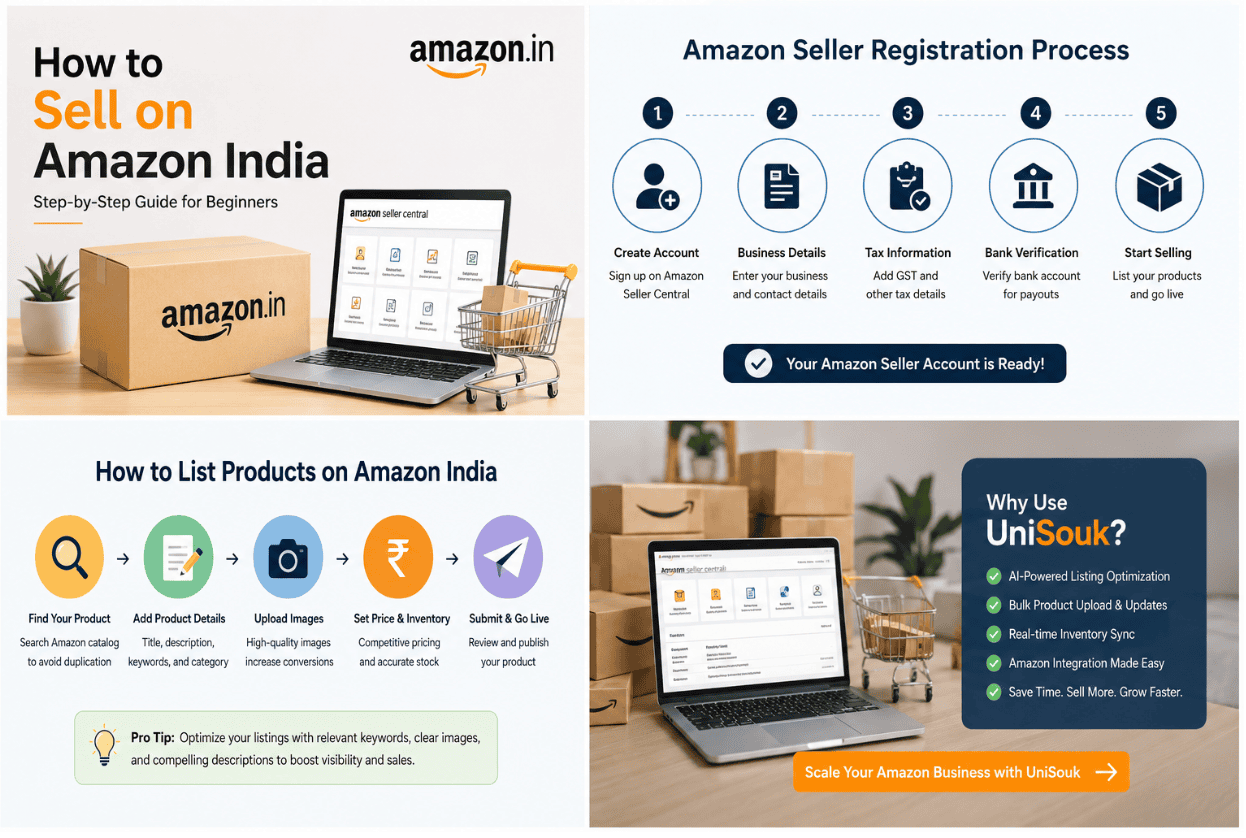
How To Sell On Amazon India: Registration Step By Step
The signup flow is not hard, but it does punish sloppy details. A wrong name, mismatched GST, or bank typo can slow things down fast. Treat the setup like a form you only want to fill once.
Step 1: Create your seller account
Start inside Seller Central and move in order:
Create your seller login with your email and mobile number.
Enter your business type, legal name, and address.
Add your PAN and GST details.
Complete KYC checks and upload any documents Amazon asks for.
Wait for verification updates, then finish the remaining profile steps.
This is where many new sellers stall. Not because the process is hard, but because names do not match across PAN, GST, and bank records. Keep the spelling identical, down to initials and punctuation.
Step 2: Add tax, pickup, and bank details the right way
Your pickup address is where Amazon or the courier expects to collect orders, so do not enter a casual or temporary address unless you can actually operate from it. Your bank account should be active, in your name or business name, and ready to receive payouts.
Amazon's seller registration guide notes that GST verification can take time, and sometimes you may need to upload the GST certificate if auto-verification fails.
Small data errors do not look small when your payout is stuck.
Step 3: Confirm your seller settings
Once your account is active, check:
display name
return address
pickup address
bank details
tax details
shipping settings
This may feel boring, but it is important. The cleaner your setup, the fewer problems you face later.
How To List Products On Amazon India So Buyers Can Find Them
A product listing is your shelf, signboard, and sales pitch all at once. If the title is weak, the photos are poor, or the details are vague, buyers move on in seconds.
Write a product page that is clear, search-friendly, and easy to trust
Start with a title that says what the product is, who it is for, and the key variation if needed, like size, color, or pack count. Your main image should be sharp and clean. The bullet points should explain benefits, not repeat the title in slightly different words.
Your description should answer the buyer's silent questions:
What is it made of?
How do you use it?
What problem does it solve?
Why should I buy this one?
Keep it short and plain. If writing product copy slows you down, an AI Listing Agent can help clean up titles, bullets, and descriptions before you publish.
What makes a strong Amazon listing?
a clear product title
at least one high-quality image
benefit-led bullet points
a short and useful description
the right keywords
a fair price
enough inventory to avoid stockouts
If one of these is weak, your listing may struggle. Buyers need to understand your product fast.
Avoid the listing mistakes that hurt new sellers the most
Bad listings usually fail for boring reasons:
the photos are dim
the title is stuffed with junk
the price looks random
the product details do not match the image
important keywords are missing
Another common mistake is missing search terms. If you sell a stainless steel water bottle, but your page barely says "bottle," you are hiding from buyers. Think like a customer. What would you type into the search bar if you wanted that item today?
How Amazon Fees, Pricing, And Shipping Affect Your Profit
This is the part many new sellers skip, and it is where money leaks. A sale does not equal profit. Amazon takes fees, shipping costs money, packaging costs money, and ads can eat into your margin if you are careless.
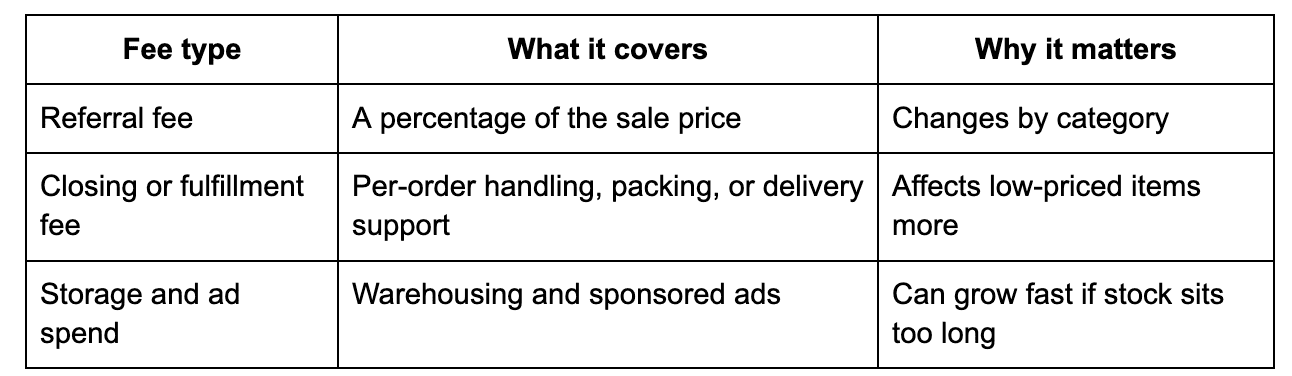
What Amazon seller fees in India can include
The exact charges depend on your category and shipping model, but these are the main buckets:
If you use Amazon fulfillment, you will also need to think about storage and handling. If you self-ship, your own courier cost matters more. Either way, the fee mix changes your real margin.
How to set a price that leaves room for profit
Do not price your product by copying the cheapest seller on page one. That is how beginners work for free.
Here is a simple example:
Product cost: Rs 180
Packaging and shipping: Rs 35
Amazon fees: Rs 60
Ad spend: Rs 15
Target profit: Rs 40
That means your selling price should be around Rs 330, not Rs 249 just because another seller listed low.
New sellers often do not lose on the product. They lose on the math.
Price with room for returns, ad tests, and small mistakes. You will make better decisions.
A simple pricing checklist
Before you set a price, ask:
What is my product cost?
How much is shipping?
What will Amazon fees take?
Do I need ad spend?
What profit do I want to keep?
If you cannot answer these clearly, your price is probably too low or too random.
What To Sell First, And How To Avoid Picking The Wrong Product
Your first product does not need to be brilliant. It needs to be practical. A good starter product has steady demand, enough margin, simple packaging, and a lower chance of returns.
Product types that often work well for new sellers
You can start by looking at:
home essentials
fashion accessories
beauty items
electronics accessories
eco-friendly goods
handmade or regional products
None of these are automatic winners. They simply give you more room to find something light, useful, and easy to ship.
If you already run a local shop or small factory, start there. Products you already understand are often safer than trendy items you found in a random video.
How to check demand before you spend money on inventory
Look at the search results on Amazon itself:
How many sellers are active?
What do the review counts look like?
Are buyers complaining about the same thing again and again?
Are there products with weak listings but decent demand?
That last point matters. If competitors have poor photos or thin copy, you may have a chance to create a better listing and win clicks.
Also check price bands. If the market is crowded between Rs 199 and Rs 249, ask yourself whether you can still earn after fees. If not, move on. A product with okay demand and sane margins beats a hot product with zero breathing room.
How To Grow Faster After Your First Few Sales
Your first few orders are not the finish line. They are feedback. They show you which title gets clicks, which image gets ignored, and whether buyers like the product you thought was a winner.
Simple ways to improve visibility and conversions
Start with the basics:
upgrade weak photos
tighten your title
rewrite bullet points so they sound useful, not stuffed
keep stock available
make sure your price still makes sense
Watch which products get views but not sales. That usually means one of three things:
the page is not convincing
the price is off
the reviews are too thin
Fix the page before you throw more ad money at it.
When automation and marketplace integrations start to matter
Once you add more products, manual work gets messy. Updating titles one by one, syncing stock by hand, and fixing catalog errors across channels can turn into a second full-time job.
That is where tools help. If you want catalog control, listing support, and multi-channel order handling in one place, UniSouk Features can save hours and cut down on avoidable mistakes.
As your catalog grows, Amazon Integrations can help you manage listings and orders with less manual work. This is also the point where many sellers start using AI help for listing cleanup, bulk edits, and marketplace sync, especially if Amazon is only one part of the business.
What Does Reselling On Amazon Mean?
A lot of beginners search for reselling on Amazon because it feels like the easiest path in.
Reselling means you buy products from a supplier, wholesaler, distributor, or manufacturer, then list and sell them on Amazon. You do not have to create your own brand right away. That can make the business simpler at the start.
Pros of reselling
lower startup barrier
easier to test product demand
faster to launch
less branding work at first
Cons of reselling
thinner margins
more competition
less control over product differentiation
harder to stand out unless your listing is strong
If you go this route, product research and pricing matter even more. You are usually competing on convenience, trust, and presentation.
Common Mistakes New Amazon Sellers Make
A lot of first-time sellers do not fail because the market is bad. They fail because of avoidable mistakes.
The most common mistakes
poor product images
weak titles
no keyword optimization
pricing too low
ignoring reviews
stock management issues
bad category selection
incomplete product details
Why these mistakes hurt
Poor images lower clicks. Weak titles lower search visibility. Bad pricing kills margins. Missing stock makes your listing lose momentum. A single issue may not ruin you, but several issues together can make a product feel invisible.
If your product page is not performing, review it like a buyer. Would you trust it? Would you click it? Would you pay that price?
Tips to grow faster on Amazon India
Once your listing is live, your goal is not just to exist on Amazon. Your goal is to improve.
Growth actions that help early sellers
improve product images
test better titles
add useful keywords
collect reviews the right way
keep stock available
watch conversion rates
adjust prices with care
run ads only when your listing is strong
A lot of sellers rush into ads too soon. That can waste money. First, make sure your listing can actually convert traffic.
Why AI tools matter as you scale
If you are adding products often, manual work slows you down. That is when AI product listing tools and marketplace automation become useful. They help with:
bulk listing cleanup
product copy improvements
catalog management
marketplace sync
faster updates across channels
If you want a simpler next step, UniSouk Official Website is a good place to explore tools for listing optimization, catalog management, and marketplace automation.
Frequently Asked Questions
How much does it cost to sell on Amazon India?
The cost depends on your product category, shipping method, and ad spend. Amazon seller fees can include referral fees, closing fees, fulfillment charges, storage fees, and advertising costs. Your final cost also depends on packaging, shipping, and returns.
Can I sell on Amazon India without GST?
In most cases, you need GST to sell taxable products on Amazon India. Some GST-exempt products may work differently, but most regular sellers should expect to register with GST. If your case is unusual, check with a tax professional before listing products.
How long does Amazon seller registration take?
Amazon seller registration can take a few days, but the timeline depends on document verification and GST checks. Delays often happen when PAN, GST, and bank details do not match exactly. Uploading the right documents early can speed things up.
Is reselling on Amazon profitable in 2026?
Yes, reselling on Amazon can be profitable if you choose the right product, price it correctly, and keep costs under control. Profit depends on demand, fees, shipping, returns, and how well your listing converts visitors into buyers.
How does UniSouk help Amazon sellers?
UniSouk helps Amazon sellers with listing optimization, catalog management, marketplace integrations, and automation. It can save time when you need to manage products, update listings, or scale across multiple channels.
Final Thoughts
Learning how to sell on Amazon India is not about knowing every detail on day one. It is about getting your documents ready, setting up your account cleanly, listing one product well, and pricing it with real costs in mind.
Start small. Keep your math honest. Improve each listing as you learn.
If you stay consistent, how to sell on Amazon India stops feeling like a huge question and starts looking like a routine you can handle.
Unify sales, Amplify scales
Registered name : NexaNode Technologies Private Limited.