Trying to connect Shopify to Amazon India sounds simple until your stock goes out of sync, orders land in two places, and one bad listing update breaks everything. If you are selling on both channels, you already know the pain of inventory mismatches, manual edits, GST headaches, invoice issues, and product data that never matches cleanly. For many business owners, a seamless Shopify Amazon integration is the only way to escape the cycle of constant manual updates and data errors.
In 2026, the pressure is higher than ever. Amazon's automated policy checks are stricter, advertising and shipping costs squeeze your margins, and one small error can slow sales on both sides. That is why more sellers now use automation to save time, avoid costly mistakes, and scale their businesses faster. Tools like UniSouk fit into that picture because they help you manage Amazon and Shopify together without turning your daily operations into a spreadsheet marathon.
Before you connect anything, get the setup right.
Key Takeaways
Build a Resilient Sales System: Combining Shopify’s brand-focused DTC experience with Amazon’s high-volume discovery engine allows you to diversify revenue and protect your business from platform-specific volatility.
Prioritize Data Hygiene: Integration failures are rarely the fault of software; ensure your SKUs, tax details, and product attributes are standardized and consistent before attempting to sync your catalog.
Automate for Scalability: Manual updates lead to inventory mismatches and overselling; use reliable integration tools and Multi-Channel Fulfillment (MCF) to handle orders, logistics, and stock levels automatically.
Test Before You Scale: Always begin by mapping a small sample of your catalog to verify order flow and price parity, which prevents costly synchronization errors and keeps your marketplace account health intact.
Why Indian Sellers Connect Shopify and Amazon
You do not pick Shopify and Amazon for the same job. You use both because each platform solves a different problem. Shopify gives you brand control, a superior customer experience, and full ownership of your store. Amazon provides instant demand, product discovery, and buyer trust. By integrating these sales channels, you build a resilient sales system that reduces your dependence on a single platform.
Here are the primary reasons why Indian sellers adopt this strategy:
You reach more buyers without needing to build all your traffic from scratch.
You move inventory faster across multiple sales channels.
You reduce manual work with centralized stock and order updates.
You nurture your brand identity on Shopify while using Amazon for high-volume visibility.
If you are currently updating stock by hand, you should prioritize automation immediately, as manual processes often become a major bottleneck.
When you sell in both places, you diversify your revenue streams. This is essential for long-term brand growth. If your Amazon search ranking dips, your Shopify site remains a steady revenue source. Conversely, if your social media ads for your DTC channel slow down, Amazon can keep your products moving.
Consider how these platforms work together. Think of your Shopify site as a private boutique on a high street, where you control the brand story, product bundles, and the entire customer journey. In contrast, Amazon acts as a bustling, crowded market nearby where shoppers discover products and compare options in seconds. For many businesses, using a DTC channel like Shopify to cultivate loyalty pairs perfectly with the logistical efficiency of Multi-Channel.
Fulfillment. Furthermore, utilizing Amazon FBA acts as a powerful trust signal for Indian buyers who prioritize fast, reliable shipping.
Whether you manage a fashion label, an electronics store, or a home decor business, this dual approach works. You get the best of both worlds: a dedicated DTC channel to build your brand and a sophisticated logistics network via Multi-Channel Fulfillment to handle high-volume demand. Ultimately, this is what successful multichannel selling looks like: one brand home, one discovery engine, and one back end that keeps your operations running smoothly.
What you need before you connect Shopify to Amazon India
A lot of sync problems start before the integration begins. Bad product data, messy SKUs, missing tax details, and half-finished shipping settings can break your workflow fast.
You should have admin access to your Shopify store, a live Amazon Seller Central account, valid GST details, finalized shipping settings, and a clear SKU structure. Some Amazon categories also need approval before you can list or match products, so check that early. Take one hour and clean this up first. It saves days of troubleshooting later.
If you are new to selling on Amazon, it helps to first understand the platform setup in detail. You can follow this How to Sell on Amazon India guide before starting integration.
Preparing your data for a seamless integration
For Indian sellers, GST compliance is critical for your operations. If your tax setup is incomplete, issues will arise during order processing. You can learn more about managing your requirements in our guide on GST compliance for Indian e-commerce.
Beyond taxes, your titles, images, and attributes must be consistent. If your catalog data is inconsistent, your SKU mapping will fail, leading to inventory errors. Accurate SKU mapping is essential because if your product identifiers do not match across both platforms, the sync will not work.
You should also be prepared for Amazon listing requirements. Amazon typically relies on ASIN matching to link products. If your item already exists on the marketplace, you will match to that listing. If it is a new product, you will need to provide valid barcodes. If you do not have these standard identifiers, you may need to apply for a GTIN exemption to create listings without them. Always ensure you have your barcodes ready or your exemption approved before you begin. Keep your process simple: match existing listings when the product is identical and create new ones only when necessary. Guessing at this stage often causes duplicate listings, suppression, and significant operational confusion.
How to connect Shopify to Amazon India, step by step
If you want to connect Shopify to Amazon without chaos, work in order. Don't start with bulk listing right away; start with clean data.
Account Setup and Catalog Integration
First, ensure you have an active Amazon Professional account, which is a requirement for using most integration tools. Verify your Seller Central India credentials, including tax information and bank details. Once your account is ready, prepare your Shopify catalog for a smooth Shopify Amazon integration. Clean product titles, consistent images, and accurate SKUs are essential to avoid issues with bulk listing later on.
To bridge the gap between channels, you will need a reliable tool. Whether you use Shopify Marketplace Connect or a specialized platform like UniSouk, the goal is to streamline your order management. When setting up your connection, keep in mind the costs involved, such as Amazon referral fees and your chosen app subscription costs. Properly mapping your products ensures that your Shopify Amazon integration stays organized, preventing duplicate listings and data mismatches.
Syncing Inventory and Managing Fulfillment
After mapping your products, enable your inventory sync settings. If you rely on Amazon FBA, ensure your stock levels are accurately reflected to avoid overselling. Using automated fulfillment settings will allow your orders to transition seamlessly from your website to Amazon, enabling Multi-Channel Fulfillment if you choose to store inventory in Amazon warehouses.
When you sync Shopify with Amazon, it is vital to perform test orders to verify that your order management flow is functioning as expected. An effective inventory sync helps maintain price parity and stock accuracy across both platforms. If you use Shopify Marketplace Connect, you can often automate these rules to ensure your stock remains updated. Remember that while Amazon FBA simplifies your logistics, you must still account for Amazon referral fees in your pricing strategy to maintain healthy margins.
Optimization and Scaling
A successful Shopify Amazon integration is only the beginning. Once your automated fulfillment is running smoothly, focus on optimizing your product listings to improve visibility. High-quality descriptions and keywords are necessary to boost your search rankings. Using AI tools for Amazon listing optimization can help you manage your product listings more effectively as you scale.
Consistent monitoring of your sales data allows you to refine your approach. By keeping your product listings updated and ensuring your stock data is accurate, you provide a better experience for customers across both channels. As you grow your business, these practices will ensure that your cross-channel strategy remains efficient and profitable.
Problems that show up during Shopify and Amazon integration
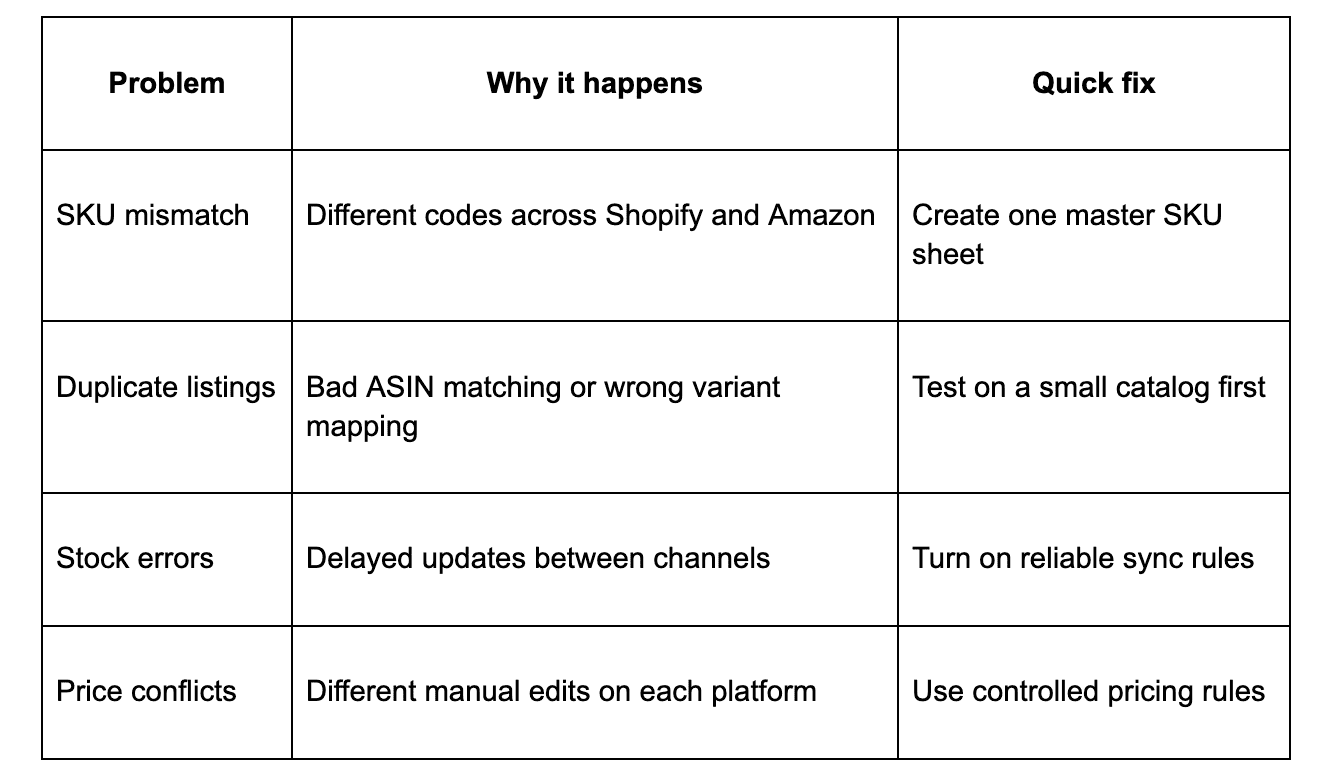
Most issues are not dramatic. They are small, repeated errors that stack up, such as wrong SKUs, slow stock updates, duplicated listings, and pricing rules that fight each other.
Here is a quick way to spot the common ones:
The takeaway is simple. Most integration problems start with bad data, not bad software.
Troubleshooting inventory, listing, and pricing conflicts
Inventory issues frequently occur when your SKUs do not align, your data updates lag, or your product mapping is incorrect. When a sale occurs on Amazon, a lack of real-time inventory synchronization often prevents your Shopify store from updating stock levels fast enough, which leads to overselling. For Indian sellers, this complexity increases if you are balancing Amazon FBM with Shopify orders, as managing multiple fulfillment streams without Multi-Channel Fulfillment can lead to significant stock discrepancies.
To prevent these conflicts, you should maintain consistent product data across both platforms by using one system as your source of truth. Implementing real-time inventory tools is the best way to ensure stock counts remain accurate across all sales channels. If you choose to manage your own Amazon FBM shipping, or if you rely on Amazon logistics for your orders, ensure your chosen software supports Multi-Channel Fulfillment to automate stock reduction. By leveraging Multi-Channel Fulfillment, you streamline your operations and minimize the risk of order cancellations.
Testing changes on a few SKUs before pushing them to your full catalog is the best way to avoid broken listings and messy Amazon marketplace integration problems. Additionally, you must establish a clear process for returns management. Handling reverse logistics across both Shopify and Amazon is vital to reduce customer friction; ensure your documentation clearly states how returns are processed to avoid negative impacts on your account health. Always remember that inconsistent pricing and manual edits in both locations will eventually create conflict, so prioritize automation to keep your operations running smoothly.
Best practices that keep both channels in sync
Once your setup is live, your focus must shift toward ongoing maintenance. A successful ecommerce integration requires daily attention to inventory levels, Buy Box competition, and order fulfillment status. If you are using a reliable Shopify Amazon sync software in India, this is where your tools prove their worth.
Streamline your product data and operations
As your catalog expands, minor inconsistencies in naming conventions lead to operational headaches. Whether you are managing product variants or updating titles, small discrepancies like "Blue XL" versus "XL Blue" cause mapping errors that break your flow. Use a standardized format for SKUs and pricing to ensure your Shopify Amazon inventory sync remains accurate. Regularly auditing your product variants ensures that your marketplace presence stays professional.
Furthermore, keep a close eye on your shipping templates. Updating your shipping templates across both channels prevents overselling and ensures that your delivery promises remain realistic. Remember that clean customer data is essential for your marketing efforts; since your Shopify store captures valuable customer data, keeping this information synced ensures you can retarget shoppers effectively.
Use automation to scale your business
Manual data entry simply does not scale. Implementing a robust ecommerce integration helps with real-time stock updates and listing management, allowing you to catch errors before they impact your metrics. Many top sellers rely on an MCF app to handle logistics, as Multi-Channel Fulfillment serves as the engine for growth. By leveraging a specialized MCF app, you can ensure that your orders are routed and fulfilled seamlessly regardless of the original sales channel.
If you are currently evaluating your options, UniSouk functions as a powerful Amazon seller automation platform, providing a multichannel selling platform that Indian sellers can use to avoid patching together disparate tools. By utilizing an MCF app, you can offload the complexities of logistics, allowing your team to focus on brand growth. When you use these automated systems to handle your Multi-Channel Fulfillment, your operations become cleaner, allowing you to scale faster while minimizing costly human errors. Ultimately, mastering Multi-Channel Fulfillment is the best way to ensure your business remains agile in a competitive market.
FAQ
Can you connect Shopify to Amazon India automatically?
Yes, you can connect Shopify to Amazon India automatically by using a reliable integration tool. To ensure success, focus on maintaining high quality for your product listings, clean SKUs, and accurate mapping. When setting up these automated systems, many sellers choose to integrate an MCF app to handle their logistics, as this helps streamline the fulfillment process across platforms.
What should you sync first, inventory or orders?
Start by syncing your inventory, pricing, and a small batch of products. It is wise to test your Shopify Amazon order sync with a few sample transactions before scaling your full catalog. If you plan to leverage Amazon's logistics network, setting up Multi-Channel Fulfillment allows you to store your inventory in Amazon centers even for sales made on your own website.
How does Buy with Prime impact my store?
Integrating Buy with Prime can significantly increase conversion rates by offering Amazon customers a familiar checkout experience. By using an MCF app, you can ensure that orders placed through Buy with Prime are processed accurately through Multi-Channel Fulfillment, providing your customers with fast, reliable shipping.
Do I need to worry about additional costs when selling on both?
Yes, when calculating your margins, you must account for Amazon referral fees on each sale. Additionally, if you use Buy with Prime to facilitate fulfillment, keep in mind that these services come with their own distinct fee structures. Always factor these costs into your pricing strategy to maintain healthy profit margins as you expand your reach across both channels.
Conclusion
When you connect Shopify to Amazon India the right way, you stop chasing errors and start building a reliable system. A proper Shopify Amazon integration offers the real benefit of faster growth, cleaner inventory control, and less manual work every day. By investing time in this process, you build long-term stability for your e-commerce operations.
The setup only works when your product data is clean, your stock sync is reliable, and your listings are optimized for conversions. Start with a small catalog, test the flow, and scale once the basics are solid. Implementing a robust Shopify Amazon integration ensures that your backend processes can handle the increased traffic as your brand expands.
If you want a simpler way to manage your channels, UniSouk is a practical option. Automation will not fix bad data, but it will save you significant time once your foundation is secure. Explore our resources or contact our team today to see how you can streamline your setup and take your business to the next level.
Unify sales, Amplify scales
Registered name : NexaNode Technologies Private Limited.